




JuniorKindergarten to Year 2
My red hat
I have a red hat. I wear it in the sun.

Typing for children, K to Year 12
Most schoolwork is now typed, and many children still hunt and peck with two fingers. XType teaches touch typing: each finger has its own keys, starting on the home row, across 125 short lessons in 14 stages, with hands on screen that light up the right finger for every key. There is a gentle junior track for Kindergarten to Year 2.
7-day free trial, then A$9.99 a month per family. Prices include GST. Renews monthly until you cancel. Cancel online any time.
Typing practice works best with a keyboard: use a computer, or a tablet with a keyboard. A phone is fine for looking around and for practising words.
Passage: Platypus facts
The platypus is one of the strangest animals in the world. It has a bill like a duck, a tail like a beaver and it lays eggs. Did you know ...
23 of 125 lessons passed
Next: V N C M drill
125
lessons in 14 stages, starting on the home row
17
junior lessons, Kindergarten to Year 2
210
original passages in three bands
2,300+
real words in the graded word bank
3
arcade games that find the slow keys
7
speed certificates, 10 to 70 words a minute
Earned, never bought
Six trophies for what a child actually does, and six keycap skins to collect with them. They sit on the child's own shelf, with the next one always in sight.

First lesson
Pass a typing lesson. The trophy is yours to keep.
Trophies come from the lessons passed, the timed tests, the accuracy and the days practised that XType already records. No extra work to unlock them.
Each trophy unlocks a keycap skin, shown on the child's awards shelf: mint, sky, amber, rose, violet and gold.
No points to lose, no leaderboard and nothing to buy. A child sees what they have earned and how to earn the next piece.
How it works
Step 1
A parent makes the account and adds the children.
Step 2
A card is needed to start. Nothing is charged for 7 days, and we email you before the trial ends.
Step 3
Short lessons, one clear next step, and the right finger lit for every key.
Step 4
From your account page, in as few steps as it took to join.
Try it now
Type a short passage from the course and see your speed and accuracy. No sign-up, and nothing you type is saved or sent.
On a phone without a keyboard this works best on a computer or a tablet with a keyboard.
The right finger
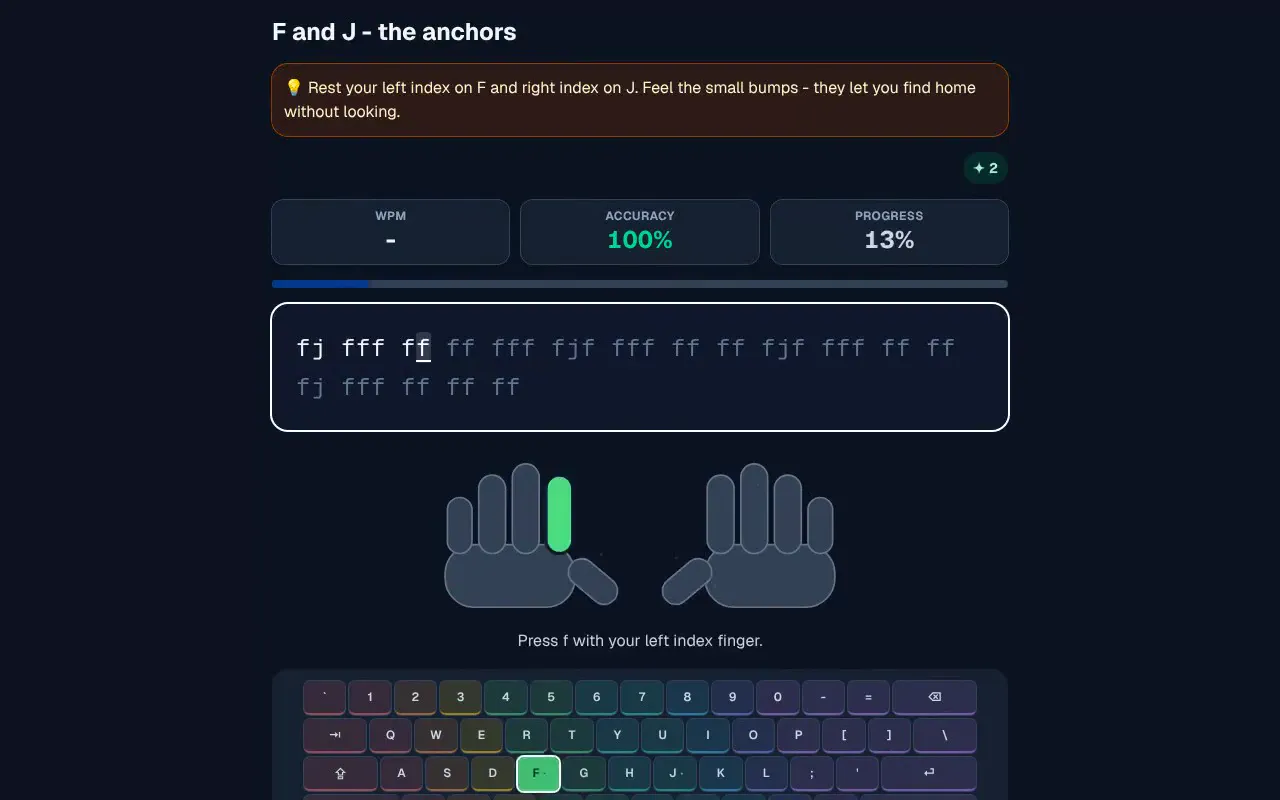
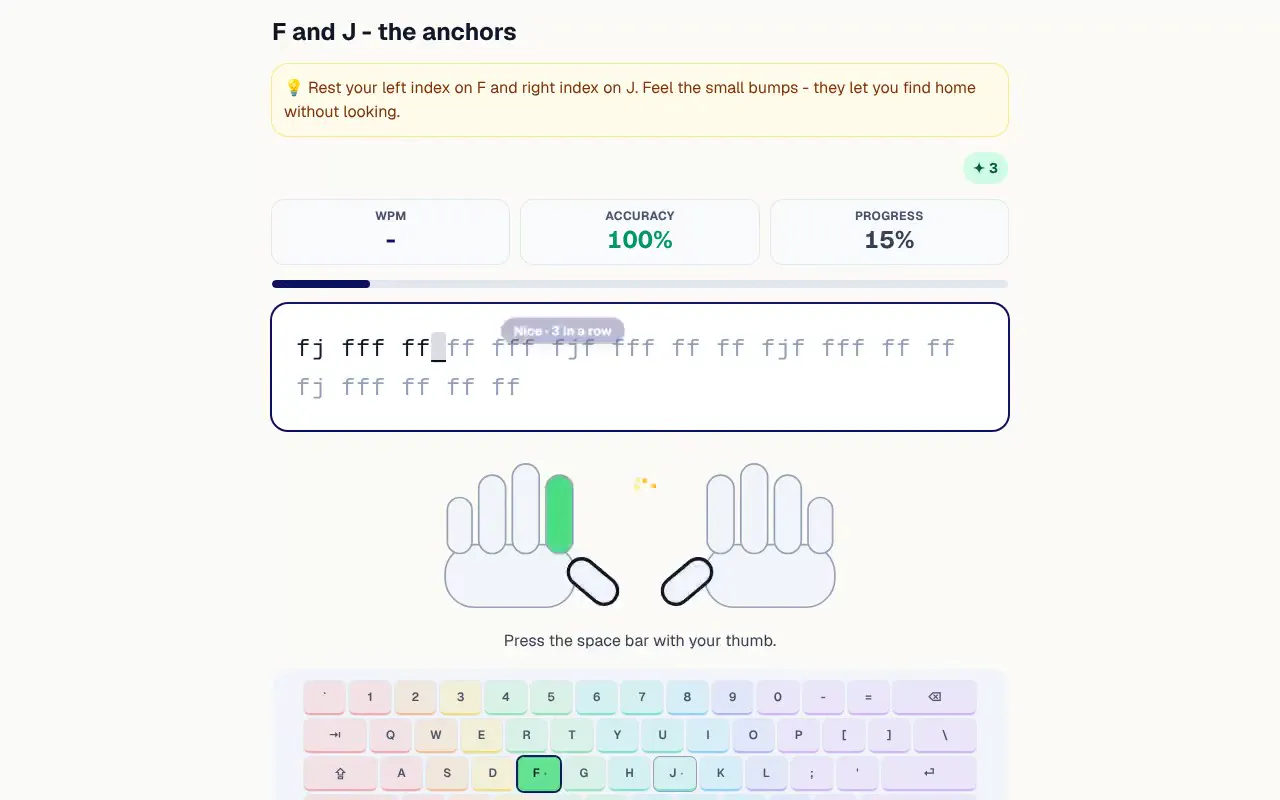
Two hands sit under the words with the finger for the next key lit, and the same is said in words underneath. For a capital, the little finger on the other hand lights up for Shift.
The course
Stage 1 · 11 lessons
Home row
F and J - the anchors, D and K, F J D K together
Stage 2 · 10 lessons
Top row
E and I, R and U, E I R U drill
Stage 3 · 11 lessons
Bottom row
V and N, C and M, V N C M drill
Stage 4 · 9 lessons
Rolls & common pairs
th, he and the, in, er, an, re, on, at, en, nd
Stage 5 · 10 lessons
Capitals & punctuation
Capital letters, Sentence case, Names and places
Stage 6 · 9 lessons
Fluency
Common words, Common words, faster, Everyday sentences
Stage 7 · 8 lessons
Word power
Word ladder: warm up, Word ladder: build, Word ladder: push
Stage 8 · 10 lessons
Real-world writing
Greetings and sign-offs, A quick email, A formal email
Stage 9 · 9 lessons
Numbers
4 5 6 7, Inner numbers drill, 1 2 3 8 9 0
Stage 10 · 8 lessons
Symbols
Quotes and colons, Brackets and slashes, Maths symbols
Stage 11 · 8 lessons
Code
Variables, Functions, Brackets and braces
Stage 12 · 6 lessons
Australian English
our and re spellings, ise and double-l spellings, Australian places
Stage 13 · 9 lessons
Speed & accuracy
Word bursts, Faster bursts, Accuracy drill
Stage 14 · 7 lessons
Speed ladder
Rung 1: 30 wpm, Rung 2: 40 wpm, Rung 3: 50 wpm
The course is a path of stages with the next lesson always one tap away. The stage your child is on is open and the rest are folded until they get there.
Every lesson has an accuracy floor to pass and a speed target for three stars, so speed never comes before getting the keys right.
Numbers, symbols, capitals and punctuation, real writing such as emails, short lines of HTML, CSS and Python for older children, and Australian spellings and places.
Kindergarten to Year 2
Young children start on the junior track: large text, one key at a time, and a tip on every lesson. The main course waits until they are ready for it.
F and J, the bumpy keys
ff jj ff jj
Feel the little bumps on F and J. Your pointer fingers live there.
F and J, the bumpy keys
ff jj ff jj
Reach up to E
see fee
T and O
hot dog
Words you know
dogs like to dig
My first story
I have a red hat. I wear it in the sun.
Practice
I have a red hat. I wear it in the sun.
The platypus is one of the strangest animals in the world. It has a bill like a duck, a tail like a beaver and it lays eggs. Did you know it closes its eyes when it swims underwater?
Stretching more than 2,300 kilometres along the Queensland coast, the Great Barrier Reef is the largest coral reef system on Earth. It is made up of almost 3,000 individual reefs and hundreds of islands. Corals are tiny animals called polyps; they build hard structures of calcium carbonate over many generations. Warmer ocean temperatures can cause "bleaching", which scientists monitor closely.
210 original passages in three bands. Each child gets the band for their school year, and a child with no year set gets the primary band.
More than 2,300 real words in three tiers feed the drills, the timed tests and the games, in Australian spelling.
3 arcade games: Falling words, Word waves and Key defender. Words holding your child's slowest keys come up three times as often.
Each word list, passage and lesson line is checked for suitability and Australian spelling before a child types it.
For parents
A chart of your child's best speed on each day they practised, with the same figures in a table beside it, and a one-line summary of the week.
Typing: my students
Not practised this week (1)Mia: speed over time
Up 20 wpm since 14 Jul
This week: 4 runs, best 34 wpm at 97% accuracy.
Certificate
30 words a minute
on a timed test at 96% accuracy
Mia Tran
Weak keys
The arcade games pick words that hold your child's slowest keys three times as often, so the practice goes where it is needed.
Slowest keys, from a made-up child. Green keys are comfortable.
Calm and private
Questions
From Kindergarten. Children in Kindergarten to Year 2 start on the junior track, with large text and accuracy first. Older children start the main course.
To learn touch typing, yes: a computer, or a tablet with a keyboard. A phone works for practising words but is not the way to learn finger placement.
Each lesson is a short set of drills on a few new keys, so a little practice most days works best.
Yes. The home page has a 60-second typing test with no sign-up. Nothing you type is saved or sent. The paid plan also starts with a 7-day free trial.
Start with the home row today.
XType is an online typing course for children from Kindergarten to Year 12. It teaches touch typing from the home row through every letter, capitals, numbers and symbols, with the right finger lit for every key, and children earn trophies and keycap skins as they practise. There is a free 60-second typing test with no sign-up. One subscription covers the whole family: A$9.99 a month per family (or A$99.90 a year), after a 7-day free trial (a card is needed to start).
More about XType: Pricing, FAQ.
XType is made by XTutio, an Australian software company that builds software for tutoring centres and families. Learn more at xtutio.com. More from XTutio.
Analytics only if you say OK.
PrivacyA few cookies, your choice.
Essential cookies keep you signed in and remember your theme. They are always on. With your OK, PostHog records which pages and buttons are used so we can improve the site. A child is never identified, and nothing a child types is recorded. Decline and everything still works. Privacy policy
